








Be Recognized for Your Achievements
The Chicago Association of REALTORS® honors the outstanding listing and selling accomplishments of our members with its annual Sales Awards Recognition. Awards are given in the categories of residential volume, residential units, rentals, and units and volume by neighborhood, in addition to commercial categories.
Residential data is pulled straight from the MLS; no off-MLS transactions may be counted unless entered into the MLS using the Comparable Sales feature. Commercial applications are separate.
This recognition allows Chicago Association of REALTORS® members to celebrate success and, more importantly, to demonstrate the power of collaboration that exists in the Chicagoland real estate market.
Top producers will be featured in the Chicago REALTOR® Magazine and receive certificates by email after the event.
NEW fOR 2025
With the recent enhancements in MRED for split production credit, our 2025 Sales Awards Recognition will split a transaction for teams and/or co-agents according to the % entered in the MLS. Continue reading for more information.
On This Page (Jump To)
Verify Your Data ↓
Apply For Commercial Awards
Review the Sales Awards FAQS
Opt out of Sales Awards Recognition
How to Verify Your Data
Ensure that you receive the credit you deserve for your 2025 sales transactions at our Sales Awards Celebration! The deadline to verify your 2025 data is Wednesday, January 7th at 11:59 PM.
To Verify Closed Listings & Sales, follow the revised verification steps below (select each option to expand):
- Log in to connectMLS.
- Click on the Search tab. Be sure the Search Type is General MLS and Property Type is Cross Property (Residential).
- Change Status selection to “CLSD” and unselect other statuses.
- Click on Add/Remove Fields.
- Add Closed Date and List Broker ID fields; click OK.
- Enter a Closed Date range from 01/01/2025 to 12/31/2025.
- Select property types: detached single, attached single, two to four units, residential land and deeded parking.
- Enter your Agent ID number in List Broker ID.
- Click on View Results. This should display all the transactions through which you were the listing agent. Review these results to make sure you have marked all your listings as closed properly.
- Repeat steps 2-4.
- Add Closed Date and Buyer Broker ID fields; click OK.
- Enter a Closed Date range from 01/01/2025 to 12/31/2025.
- Select property types: detached single, attached single and two to four units.
- Enter your Agent ID number in Buyer Broker ID.
- Click on View Results. This should display all the transactions through which you were the selling agent. Review these results to make sure other agents have marked all of your sales properly.
MRED introduced split production credit this year. The Sales Awards Program has long recognized Chicago REALTORS® members and teams for their sales accomplishments based on closed transactions as reported in MRED. With these new system enhancements, the recognition program is evolving to ensure it continues to recognize your achievements as reported in MRED.
What is split production credit? If you are on a Team or Co-List/Co-Sell with another agent, MRED has new fields when closing out the transaction that allows the participating parties to indicate how they wish to “split” credit for the transaction. The split is decided by the participating parties but must add up to 100%. The transaction unit and sales volume will then be split in accordance with those percentages.
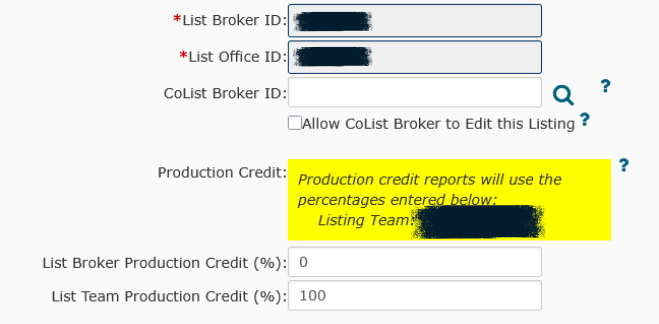
Team Example: Agent A is affiliated with Team Chicago in the MLS and lists a property that sells for $400,000. When closing out the transaction, Agent A chooses to award 100% of the transaction credit to the Team. They enter those details in the List Broker/List Team Production Credit of the MLS.
For Sales Awards purposes, Agent A will receive no credit even though they were the listing agent of the transaction, and the Team will receive 100% credit, resulting in 1 transaction unit and $400,000 in sales volume to the Team. This same logic will apply to any percentage split entered.
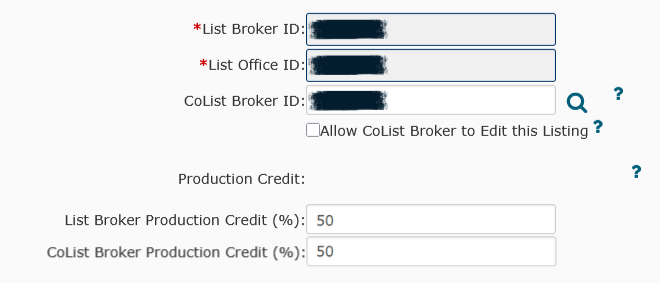
Co-List/Co-Buy Example: Agent A and Agent B decide to list and co-list a property that sells for $300,000. When closing out the transaction, they choose to split the transaction so that 50% goes to Agent A and 50% goes to Agent B. They enter those details in the List Broker/CoList Broker Production Credit of the MLS.
For Sales Awards purposes, Agent A will receive a 0.50 transaction unit and $150,000 sales volumes, and Agent B will receive a 0.50 transaction unit and $150,000 sales volume. This same logic will apply to any percentage split entered.
To verify your Team or Split Production Credit:
- Log in to connectMLS.
- Click on the Reports tab. Select Market Share Report.
- Select property types: detached single, attached single, two to four units, residential land and deeded parking.
- Enter a Closed Date range from 01/01/2025 to 12/31/2025.
- Click Generate Report. This will provide total sides and total volume in accordance with any split production % entered for a transaction.
- Verify this total for accuracy. To review or edit any transactions and their specific split production percentage, go to My Listings/Transactions and change it from All Actives/Pendings to Closed. We recommend you sort by Closed Date.
- Hit the Edit Pencil to Edit List Broker/List Production Credit (List Side) or Edit Team Broker and/or Edit Buyer Broker Production Credit (Buy-Side)
For transactions entered into the MLS under the Outside MLS Comparable Sales feature, these transactions do not display in a regular search and are only visible under My Listings/Transactions. To verify if an Outside Comparable is in the MLS system:
- Click My Listings/Transactions.
- In the drop-down menu for status, change it from All Actives/Pending to Outside Comps – Closed.
- Verify your transaction displays and reflects a Closed date range from 01/01/2025 to 12/31/2025.
While these transactions do not display in a regular MLS search, they are accessible to the association when pulling Sales Awards data from the MLS.
Please note that only off-market MLS transactions in status COMP-CLSD will count towards sales awards recognition. Off-market rentals and off-market rentals in status COMP-RNTD do not count towards sales awards recognition.
About Teams
- Reporting production as a team in the MLS is a voluntary election made by the team lead. If a team is formed in the MLS, a Team ID is issued.
- Listings for a team must be entered under the TEAM ID – should read similar to “Mickey Mouse on behalf of CAR Team,” or with the appropriate split production credit to the team when closing out the transaction in MRED.
- Team production is pulled using the TEAM ID and/or any specific split production credit issued to the team.
- The Team lead chooses whether a Team member can ONLY add listings under the Team ID or if the Team member can add a listing under the Team or under their personal ID. This decision is made when a Team member is added. Listings added under a personal ID may not show up under the Team production unless the listing agent is affiliated with the team and specifically gives production credit to the team utilizing MRED’s split production credit.
- Before closing out a transaction, confirm that the correct ID number is the Team Lead’s or the individual agent’s, and if using MRED’s split production credit, the correct percentages are entered.
- IMPORTANT: To switch to a personal account, a team member must click the link at the top of the window to switch to their personal account.
What if a Transaction is Not Showing Up?
The most common problem with a transaction not showing correctly is the listing company not listing the selling agent. Here are steps to correct this. The selling agent should contact the listing agent and ask that the correction be made. If the listing agent refuses to make the corrections:
- The managing broker of the selling office should contact the listing office managing broker and request the changes be made.
- If there is no response, contact MRED’s Rules & Regulations Department at (630) 955-0011 to request a form to report the company.
- DO NOT WAIT UNTIL THE LAST MINUTE TO MAKE CORRECTIONS!
The deadline for changes in the MLS system is Wednesday, January 7th at 11:59 PM. Please e-mail questions to salesawards@chicagorealtor.com.
What if you need help with your settings in MRED?
The MRED help desk is a great resource for teams and individuals! Contact their support team through the MRED portal. Their business hours and emergency hours are posted in the top right corner.
PHONE: 630-955-2755 | EMAIL: help.desk@MREDLLC.com